2026-03-27
home automation part 1
electronics · diary
Today i wanted to talk about how i recently got into automation. I have a “server”, which is just a laptop without a screen, glued on the underside of my desk (i know, i know), linked to my network using a 10/100 24 port switch that a friend of mine generously gave to me (also glued to my desk).
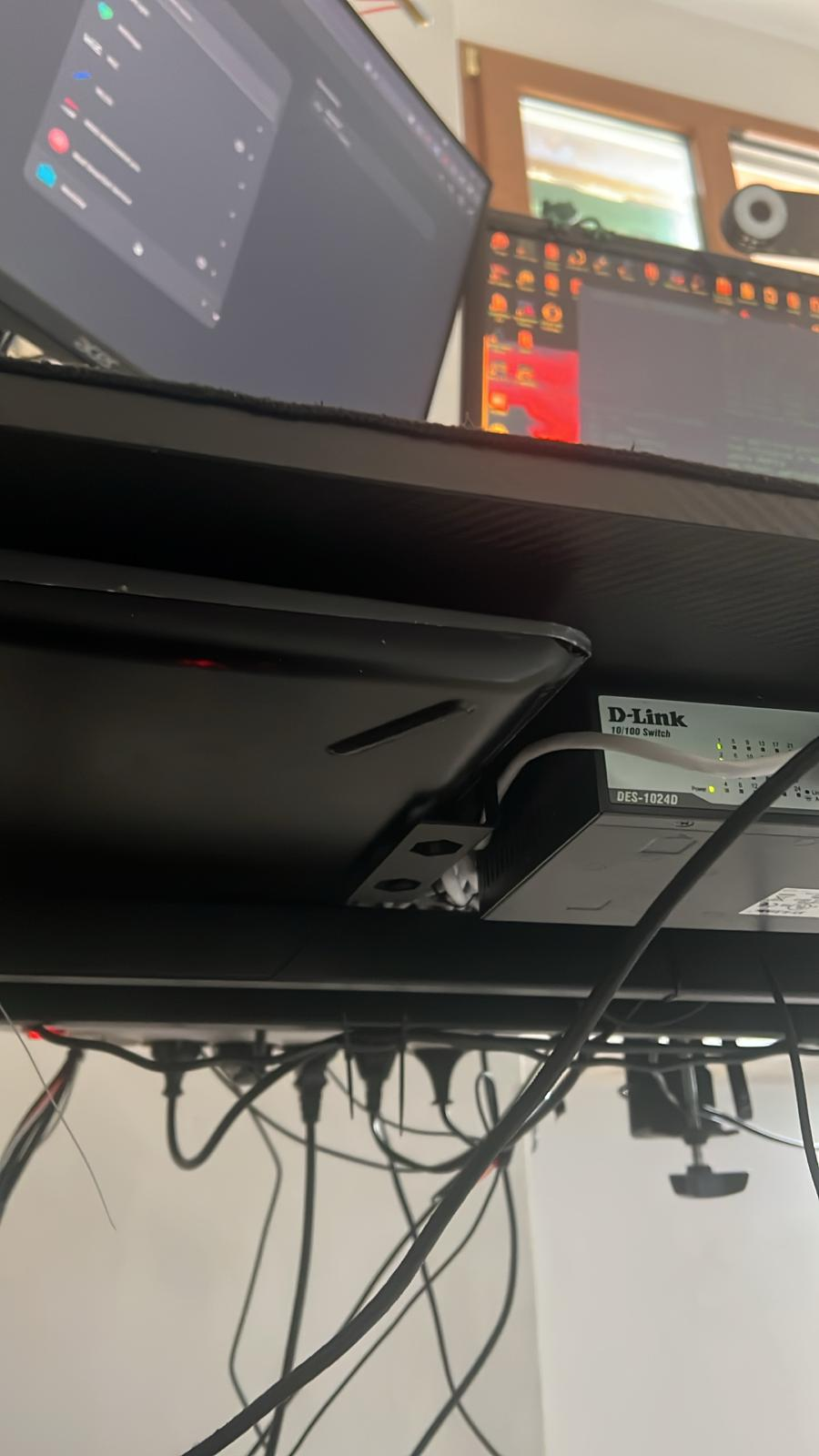 i had quite some time to think about what to host in this server, and i came up with the idea to host a homeassistnat instance using docker and not the official image, and so i did. I later integrate the very few smart devices i have in my home (2 smart lights and a smart socket). But that wasn’t enough for me since i wanted to control more stuff, mainly powering my desk setup and my workbench, since when i go to sleep i have to power off a lot of devices that light pollute my room in order to actually sleep. And so i made this:
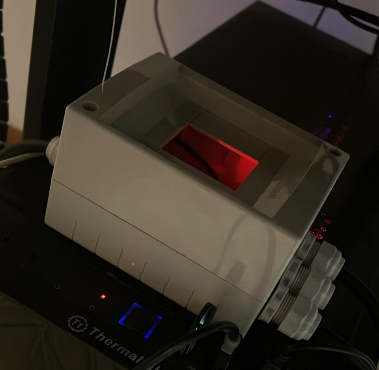 That is just an electrical box with a 3 relay module and a esp32-c3 from aliexpress.
It has 4 cables coming out of it, one has a male electrical socket at the end, to take power in and the other 3 have some female electrical sockets to give power out. The schematic is as follow
That is just an electrical box with a 3 relay module and a esp32-c3 from aliexpress.
It has 4 cables coming out of it, one has a male electrical socket at the end, to take power in and the other 3 have some female electrical sockets to give power out. The schematic is as follow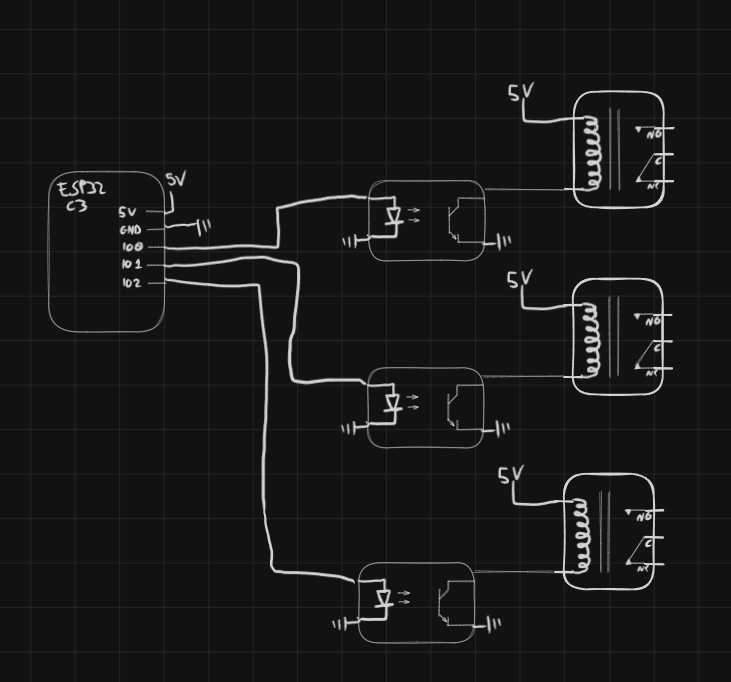 And of course the relays interrupt either the phase or neutral of the mains line, it does not matter which one in particular since the plugs could always be flipped when plugging them in so there’s no sense in distinguishing what gets actually opened (the actual correct way of doing this would be to cut both N and L using double poles relays).
Anyway i ended up spending more money on correctly sized cables and cable glands and the up to code electrical box (i would like to avoid a home fire), and it shows because even though the relays are marked as 230v 10a, relay number 2 shit itself after trying to switch my computer which should be around .8 Kw so even though it is within the relay maximum current (800 W / 230 V = 3.47 A) it welded itself open (i think at least), there should be a lesson about inrush current somewhere here but i cannot be bothered to learn it since the rated current for the relay is almost triple what the psu should pull, i think it just boils down to cheapo Chinese manufacturing and QC standards.
For now i 2 contacts will have to do.
Let’s talk about firmware real quick. The firmware is written in circuit python since now i can update it without having to plug the esp32 to the computer every time i have to flash new firmware, and it basically just posts relay states and read commands in mqtt on my network, the broker is hosted in the same machine as the homeassistant server.
The firmware is pretty simple and here it is if anyone is interested:
And of course the relays interrupt either the phase or neutral of the mains line, it does not matter which one in particular since the plugs could always be flipped when plugging them in so there’s no sense in distinguishing what gets actually opened (the actual correct way of doing this would be to cut both N and L using double poles relays).
Anyway i ended up spending more money on correctly sized cables and cable glands and the up to code electrical box (i would like to avoid a home fire), and it shows because even though the relays are marked as 230v 10a, relay number 2 shit itself after trying to switch my computer which should be around .8 Kw so even though it is within the relay maximum current (800 W / 230 V = 3.47 A) it welded itself open (i think at least), there should be a lesson about inrush current somewhere here but i cannot be bothered to learn it since the rated current for the relay is almost triple what the psu should pull, i think it just boils down to cheapo Chinese manufacturing and QC standards.
For now i 2 contacts will have to do.
Let’s talk about firmware real quick. The firmware is written in circuit python since now i can update it without having to plug the esp32 to the computer every time i have to flash new firmware, and it basically just posts relay states and read commands in mqtt on my network, the broker is hosted in the same machine as the homeassistant server.
The firmware is pretty simple and here it is if anyone is interested:
import json
import os
import ssl
import time

import board
import digitalio
import microcontroller
import socketpool
import wifi
from adafruit_minimqtt.adafruit_minimqtt import MMQTTException, MQTT


RELAYS = (
    {"number": 1, "pin": board.IO0},
    {"number": 3, "pin": board.IO2},
)
STATUS_LED_PIN = board.IO8
RELAY_ON_VALUE = True
RELAY_OFF_VALUE = False


def log(message):
    print(message)


def required_env(name):
    value = os.getenv(name)
    if value is None or value == "":
        raise RuntimeError("Missing required setting: {}".format(name))
    return value


def optional_env(name, default=""):
    value = os.getenv(name)
    return default if value is None else value


def optional_int(name, default):
    raw_value = os.getenv(name)
    if raw_value in (None, ""):
        return default
    return int(raw_value)


def default_device_id():
    uid = getattr(microcontroller.cpu, "uid", b"")
    if not uid:
        return "esp32_relay_board"
    return "esp32_relay_board_{}".format("".join("{:02x}".format(byte) for byte in uid))


class StatusLed:
    WIFI = "wifi"
    MQTT = "mqtt"
    READY = "ready"

    def __init__(self, pin):
        self._led = digitalio.DigitalInOut(pin)
        self._led.direction = digitalio.Direction.OUTPUT
        self._mode = None
        self._last_toggle = time.monotonic()
        self._value = False
        self.set_mode(self.WIFI)

    def set_mode(self, mode):
        if self._mode == mode:
            return
        self._mode = mode
        self._last_toggle = time.monotonic()
        self._value = False
        self._apply()
        if mode == self.READY:
            self._value = True
            self._apply()

    def _apply(self):
        self._led.value = self._value

    def update(self):
        if self._mode == self.READY:
            if not self._value:
                self._value = True
                self._apply()
            return

        interval = 0.5 if self._mode == self.WIFI else 0.125
        now = time.monotonic()
        if now - self._last_toggle >= interval:
            self._last_toggle = now
            self._value = not self._value
            self._apply()


class RelayBoard:
    def __init__(self, relays):
        self._pins = []
        self.numbers = []
        self.states = []
        for relay in relays:
            pin = relay["pin"]
            output = digitalio.DigitalInOut(pin)
            output.direction = digitalio.Direction.OUTPUT
            output.value = RELAY_OFF_VALUE
            self._pins.append(output)
            self.numbers.append(relay["number"])
            self.states.append(False)

    def set_state(self, index, is_on):
        self.states[index] = is_on
        self._pins[index].value = RELAY_ON_VALUE if is_on else RELAY_OFF_VALUE
        log("Relay {} -> {}".format(self.numbers[index], "ON" if is_on else "OFF"))


class App:
    def __init__(self):
        self.wifi_ssid = required_env("CIRCUITPY_WIFI_SSID")
        self.wifi_password = optional_env("CIRCUITPY_WIFI_PASSWORD")
        self.mqtt_host = required_env("MQTT_HOST")
        self.mqtt_port = optional_int("MQTT_PORT", 1883)
        self.mqtt_username = optional_env("MQTT_USERNAME")
        self.mqtt_password = optional_env("MQTT_PASSWORD")
        self.mqtt_base_topic = optional_env("MQTT_BASE_TOPIC", "home/relayboard").rstrip("/")
        self.discovery_prefix = optional_env("MQTT_DISCOVERY_PREFIX", "homeassistant").rstrip("/")
        self.device_id = optional_env("DEVICE_ID", default_device_id())
        self.device_name = optional_env("DEVICE_NAME", "ESP32 Relay Board")

        self.availability_topic = "{}/status".format(self.mqtt_base_topic)
        self.status_led = StatusLed(STATUS_LED_PIN)
        self.relays = RelayBoard(RELAYS)
        self.socket_pool = None
        self.mqtt_client = None

        log("Booting CircuitPython relay controller")
        log("Device ID: {}".format(self.device_id))
        log("Wi-Fi SSID: {}".format(self.wifi_ssid))
        log("MQTT broker: {}:{}".format(self.mqtt_host, self.mqtt_port))
        log("Base topic: {}".format(self.mqtt_base_topic))

    def relay_state_topic(self, relay_index):
        return "{}/relay{}/state".format(self.mqtt_base_topic, self.relays.numbers[relay_index])

    def relay_command_topic(self, relay_index):
        return "{}/relay{}/set".format(self.mqtt_base_topic, self.relays.numbers[relay_index])

    def publish_availability(self, state):
        self.mqtt_client.publish(self.availability_topic, state, retain=True)
        log("Published availability {} -> {}".format(self.availability_topic, state))

    def publish_relay_state(self, relay_index):
        payload = "ON" if self.relays.states[relay_index] else "OFF"
        topic = self.relay_state_topic(relay_index)
        self.mqtt_client.publish(topic, payload, retain=True)
        log("Published state {} -> {}".format(topic, payload))

    def publish_all_states(self):
        for relay_index in range(len(self.relays.states)):
            self.publish_relay_state(relay_index)

    def publish_discovery(self):
        for relay_index in range(len(self.relays.states)):
            relay_number = self.relays.numbers[relay_index]
            unique_id = "{}_relay{}".format(self.device_id, relay_number)
            topic = "{}/switch/{}/config".format(self.discovery_prefix, unique_id)
            payload = {
                "name": "{} Relay {}".format(self.device_name, relay_number),
                "uniq_id": unique_id,
                "stat_t": self.relay_state_topic(relay_index),
                "cmd_t": self.relay_command_topic(relay_index),
                "pl_on": "ON",
                "pl_off": "OFF",
                "avty_t": self.availability_topic,
                "pl_avail": "online",
                "pl_not_avail": "offline",
                "dev": {
                    "ids": [self.device_id],
                    "name": self.device_name,
                    "mf": "Codex",
                    "mdl": "ESP32-C3 Relay Board",
                },
            }
            self.mqtt_client.publish(topic, json.dumps(payload), retain=True)
            log("Published discovery {}".format(topic))

    def handle_message(self, _client, topic, message):
        log("MQTT RX {} -> {}".format(topic, message))
        normalized = str(message).strip().upper()
        for relay_index in range(len(self.relays.states)):
            if topic == self.relay_command_topic(relay_index):
                if normalized == "ON":
                    self.relays.set_state(relay_index, True)
                elif normalized == "OFF":
                    self.relays.set_state(relay_index, False)
                else:
                    log("Ignoring unsupported payload for relay {}: {}".format(self.relays.numbers[relay_index], message))
                    return
                self.publish_relay_state(relay_index)
                return
        log("Unhandled topic {}".format(topic))

    def connect_wifi(self):
        self.status_led.set_mode(StatusLed.WIFI)
        while True:
            try:
                log("Connecting to Wi-Fi {}".format(self.wifi_ssid))
                wifi.radio.connect(self.wifi_ssid, self.wifi_password)
                log("Wi-Fi connected, IP: {}".format(wifi.radio.ipv4_address))
                return
            except Exception as error:
                log("Wi-Fi connection failed: {}".format(error))
                self.wait_with_led(5.0)

    def build_mqtt_client(self):
        self.socket_pool = socketpool.SocketPool(wifi.radio)
        ssl_context = ssl.create_default_context()
        client = MQTT(
            broker=self.mqtt_host,
            port=self.mqtt_port,
            username=self.mqtt_username or None,
            password=self.mqtt_password or None,
            client_id=self.device_id,
            is_ssl=False,
            keep_alive=60,
            socket_pool=self.socket_pool,
            ssl_context=ssl_context,
        )
        client.on_message = self.handle_message
        client.will_set(self.availability_topic, "offline", retain=True)
        return client

    def connect_mqtt(self):
        self.status_led.set_mode(StatusLed.MQTT)
        while True:
            try:
                log("Connecting to MQTT {}:{}".format(self.mqtt_host, self.mqtt_port))
                self.mqtt_client = self.build_mqtt_client()
                self.mqtt_client.connect()
                log("MQTT connected")
                for relay_index in range(len(self.relays.states)):
                    topic = self.relay_command_topic(relay_index)
                    self.mqtt_client.subscribe(topic)
                    log("Subscribed {}".format(topic))
                self.publish_availability("online")
                self.publish_discovery()
                self.publish_all_states()
                self.status_led.set_mode(StatusLed.READY)
                return
            except Exception as error:
                log("MQTT connection failed: {}".format(error))
                self.safe_disconnect_mqtt()
                self.wait_with_led(5.0)

    def safe_disconnect_mqtt(self):
        if self.mqtt_client is None:
            return
        try:
            self.mqtt_client.disconnect()
        except Exception:
            pass
        self.mqtt_client = None

    def wait_with_led(self, seconds):
        deadline = time.monotonic() + seconds
        while time.monotonic() < deadline:
            self.status_led.update()
            time.sleep(0.05)

    def ensure_connections(self):
        if not wifi.radio.ipv4_address:
            self.safe_disconnect_mqtt()
            self.connect_wifi()
            self.connect_mqtt()
            return

        if self.mqtt_client is None:
            self.connect_mqtt()

    def run(self):
        self.connect_wifi()
        self.connect_mqtt()

        while True:
            self.status_led.update()
            self.ensure_connections()
            try:
                self.mqtt_client.loop(timeout=1.0)
            except (MMQTTException, OSError, RuntimeError) as error:
                log("MQTT loop error: {}".format(error))
                self.safe_disconnect_mqtt()
                self.status_led.set_mode(StatusLed.MQTT)
                self.wait_with_led(1.0)
            time.sleep(0.05)


app = App()
app.run()
Then i just integrated it in home assistant and with a homekit bridge i can integrate it in the home app of ios and set up some scenes so that i can just turn of everything with Siri or the home app when i want to go to sleep or i’m heading out. Then having a smart light besides my bed
I can streamline my waking up/going to sleep routines (also spoilers on the entertaining system)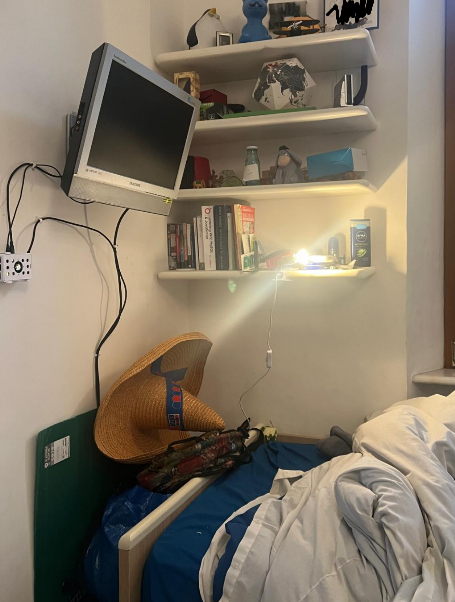
Perhaps today i will work on my “desk companion” which is just a esp32 with a mosfet to control a screen light and a 1602 lcd display just below my monitor, i have made this a while ago and it is standalone and is controlled from a web interface:
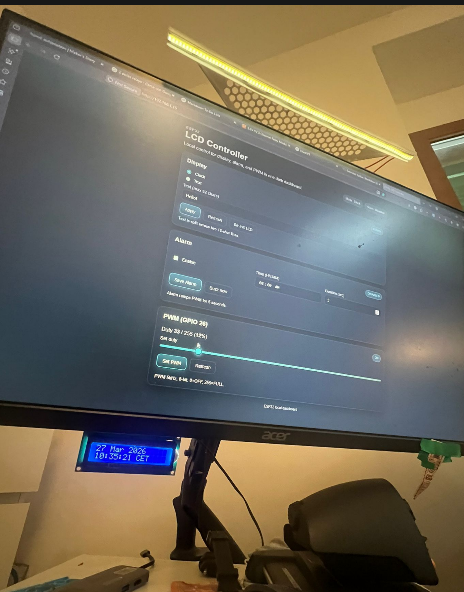
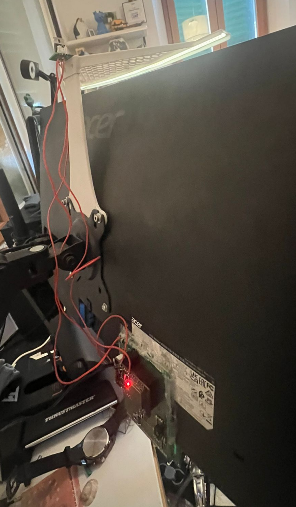
Also the vesa light bar mount can be found on my printables page it is one of my first design so go easy. I would like to transition it from a web interface to a mqtt client so that i can integrate it in home assistant and use the lcd to show important information like stuff from a calendar integration or network/docker diagnostics. I would also like to take a look at node red in the near future for more complicated automation scripts like a progressive lighting up of my room as my alarm approaches, i would also like to install motorized blinds in my windows.
So for now that’s it for today, thank you for reading this!