2026-03-30
home automation part 4
electronics · network · diary
poor mans presence sensor
Today i tackled the classic automation use-case to turn on and off stuff depending on the state of some presence sensors. This in my experience is what makes up the majority of the ROI of a automation system. Granted for now it’s just the workbench, a light and some screens, so it does not cut down on wasted energy that much, the real magic is when we factor in HVAC and window sensors, but i’m very much not there yet. On that note let me quickly write down what i did today: - Made esphome work on the cheap esp32-c3 devboards (unrelated) - I extracted my IRK code from my phone - I integrated my phone as a private BLE device - Using Bermuda i can now know the distance between the server (in my room) and my phone - Made a helper template switch for manual operation of the system - Interacting with my 3d printer to avoid removing power while printing - Using node-RED i can then implement the logic for sensing and actuation
ESPHome
You can read this ESPHome part 1 to check out what was wrong
IRK
I was able to use ESPHome and a specific irk extraction firmware to get the irk code of my phone, specifically used Derek Seaman irk-capture firmware, very nice, worked nicely first try, well done mr. Seaman.
private BLE device
Using that IRK i am just able to integrate it as a private BLE device on stock hass
Bermuda
This is where it gets interesting. Using HACS i am able to install Bermuda that instantly gets the private BLE device and have a fast refresh distance entity for my phone
manual override
Just a basic switch template:
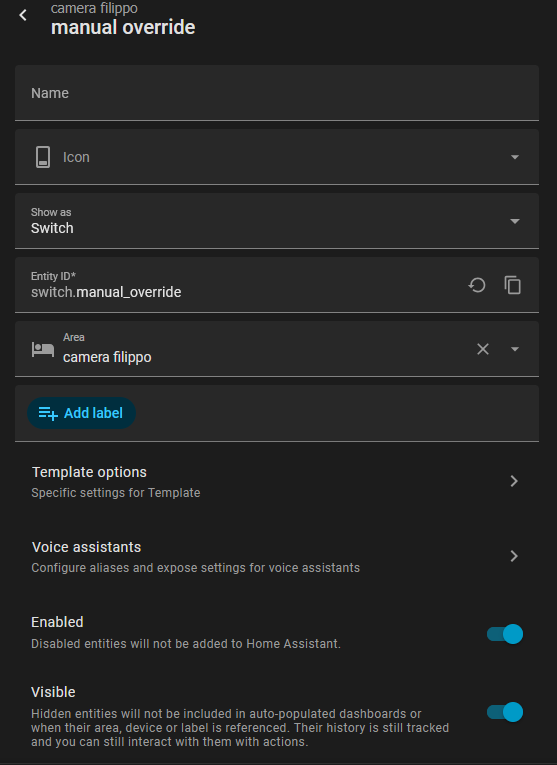 This is basically acts as a global variable between node-RED and home assistant
3d printer
The 3d printer setup actually is quite convoluted, and it also does introduce a circular usage dependency. That’s the reason we are going to look at node-RED in here:
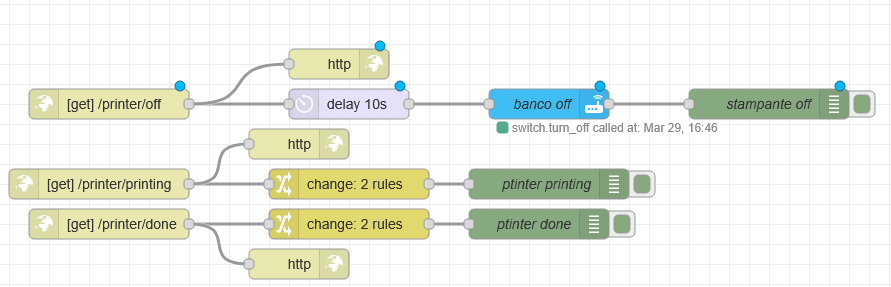 (Yes i know i am using GET)
This just set global variables based on the 3d printer state, where i defined macros to actually use these endpoint using gcode shell commands and curl:
(Yes i know i am using GET)
This just set global variables based on the 3d printer state, where i defined macros to actually use these endpoint using gcode shell commands and curl:
[gcode_shell_command _notify_printing]
command: curl -s "http://192.168.1.22:1880/printer/printing"
timeout: 10.
verbose: False

[gcode_shell_command _notify_done]
command: curl -s "http://192.168.1.22:1880/printer/done"
timeout: 10.
verbose: False

[gcode_shell_command _poweroff_via_nodered]
command: curl -s "http://192.168.1.22:1880/printer/off"
timeout: 10.
verbose: False

[gcode_macro _AUTO_POWEROFF]
description: Stores whether printer should power off after print
variable_enabled: 0
gcode:
    RESPOND MSG="Auto poweroff is {'ON' if printer['gcode_macro _AUTO_POWEROFF'].enabled|int == 1 else 'OFF'}"

[gcode_macro _AUTO_POWEROFF_ON]
description: Enable auto poweroff at end of print
gcode:
    SET_GCODE_VARIABLE MACRO=_AUTO_POWEROFF VARIABLE=enabled VALUE=1
    RESPOND MSG="Auto poweroff enabled"

[gcode_macro _AUTO_POWEROFF_OFF]
description: Disable auto poweroff at end of print
gcode:
    SET_GCODE_VARIABLE MACRO=_AUTO_POWEROFF VARIABLE=enabled VALUE=0
    RESPOND MSG="Auto poweroff disabled"
[gcode_macro START_PRINT]
gcode:
  {% set BED = params.VALUE|default(60)|float %}
  RUN_SHELL_COMMAND CMD=_notify_printing
  M190 S{BED}

  G90 ; use absolute coordinates
  M83 ; extruder relative mode
  G4 S30 ; allow partial nozzle warmup
  {% if printer.toolhead.homed_axes != "xyz" %}
    G28
  {% endif %}
  BED_MESH_CALIBRATE
  SMART_PARK

[gcode_macro END_PRINT]
gcode:
    # Turn off bed, extruder, and fan
    M140 S0
    M104 S0
    M106 S0
    # Move nozzle away from print while retracting
    G91
    G1 X-2 Y-2 E-3 F3000
    # Raise nozzle by 10mm
    G1 Z10 F3000
    G90
    G1 Y200
    RUN_SHELL_COMMAND CMD=_notify_done
    {% if printer["gcode_macro _AUTO_POWEROFF"].enabled|int == 1 %}
      RESPOND MSG="Auto poweroff is enabled, shutting down soon"
      RUN_SHELL_COMMAND CMD=_poweroff_via_nodered
    {% else %}
      RESPOND MSG="Auto poweroff is disabled"
    {% endif %}
Node-RED logic
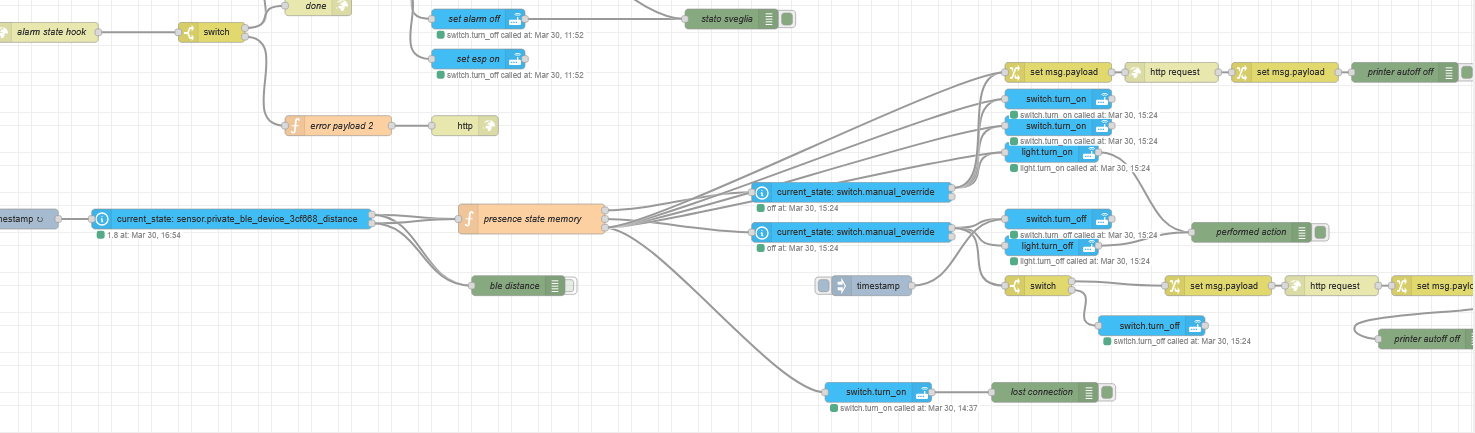 This is the flow that handles presence, let’s go over it from left to right, i have a inject node that triggers every 1.5 sec. Then i extract the state of the Bermuda entry and feed it to this function block:
// output 1 = inside -> ON
// output 2 = outside -> OFF
// output 3 = lost after previously inside -> manual override ON

let raw = msg.payload;
let distance = Number(raw);
let isNumeric = Number.isFinite(distance);

let currentMode;
if (isNumeric) {
    currentMode = distance < 5 ? "inside" : "outside";
} else {
    currentMode = "lost";
}

let previousMode = flow.get("bleMode") || null;

// always update stored mode
flow.set("bleMode", currentMode);

// do nothing if mode did not change
if (currentMode === previousMode) {
    return null;
}

// decide action only on transitions
if (currentMode === "inside") {
    return [msg, null, null];
}

if (currentMode === "outside") {
    return [null, msg, null];
}

// currentMode === "lost"
if (previousMode === "inside") {
    return [null, null, msg];
}

// lost after outside/lost -> normal off or nothing
return [null, msg, null];
This just check if the previous state was inside the range and the current state is disconnected it false it goes into a fault state (because it means my phone died inside the room) and sets the system to manual, other wise it changes the states of the devices according to their logic: - The screens and light just turn off - The printer is a bit more convoluted - If it is not printing it turns off - If it is printing it calls the macro that then will call back to node red once it is done printing to turn itself off
the end
This works for me quite nicely and the only edge case i have not covered is if my phone runs out of battery while outside the range of the ble adapter of the server, in that case when i come home i have no way (beside using another device) to turn everything back on. Ofc i can unpower the relay box since everything is NC i will get power back to the printer and my PC, and also my main light is unsmart so it will always work :3. I am thinking to make a override physical switch to set everything into manual mode and then turn on everything for good measure using ESPHome.
That is it for today, thank you for the read and if you have any questions remember that you can mail me at fippolo@r4inbow.ddns.net , have a nice day :)